
So you’re looking at a handful of your videos stats asking yourself, “Why did these videos get way less views than my other videos? Are these low views affecting my channels success? Would it help if I deleted them from my channel?” …Not So Fast!
Before you delete poor performing videos, ask yourself why those videos performed poorly in the first place. Was it bad timing, bad metadata/thumbnail, poor production or are they just shitty videos? All shitty videos should be unlisted or made private.
Shitty (adj.) – a technical term used to describe anything that is seen as undesirable due to inadequacy, poor quality or relevance.
If they are NOT shitty, and you believe the videos are good, but they just didn’t perform well, then here’s what you should do:
-Analyze the audience retention statistics for each video in question. (Found in YouTube Studio. Click Content, Select Video, Click Analytics, then Click Engagement. Scroll All the way down and find the section called AUDIENCE RETENTION.)
–Focus on the line graph directly underneath the mini-player titled “Key moments for audience retention“. YouTube has made this part much easier with AI integrations directly underneath the graph that tells you exactly how many viewers clicked on your video, but stopped watching in less than 30 seconds.
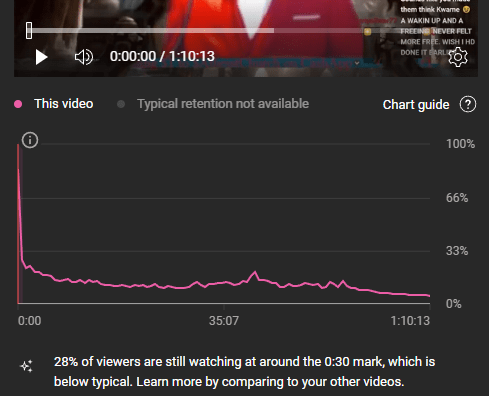
This is called a “Bounce” and causes severe negative impact to the success of videos on YouTube. Ideally, you want 0 bounces, which means your audience retention would be stated as 100%. Realistically, even the best vids don’t retain 100% of viewers, so your goal is to get that number as close to 100% as possible.
Which means editing your video directly in the YouTube Online Editor.
–Determine what edits to make using the Audience Retention graph. What you’re looking for are any moments in the graph with significant drops. Typically, a poor performing video will have a line graph that starts at 100%, then immediately drops by a large amount within the first minute of the video. If this is the case, then your problem is the intro, i.e. the first 30-60 seconds of the video. Something about it is causing people who clicked the video, to stop watching after only a few seconds. There are multiple potential reasons why people do that, but for now lets just fix the problem, you can ask me directly for more info on how to engage viewers and increase retention in the forums if you wish.
-If the line graph drops off at some other part of the video, watch that part and determine what may be turning people off. Could be something you said, an irritatinf noise in the background, or something not so family friendly, etc…
-Now, with the drop-offs in mind, head over to the YouTube online video editor found in the sidebar under analytics. (I usually open this in a separate window so I can refer back to the graph if needed.)
–Trim or Cut-Out all portions that had a significant drop off. (Meaning, if the drop-off was in the first minute, trim out the first minute and hit publish) Wait for processing to complete, then click save.
-Once you’re all trimmed up, re-share your newly edited video to your social media and also create a post, linking to the video in the community section of your channel.
Go ahead and update the metadata (title, description, tags, etc.), just for good measure. Once all of these edits are done processing, watch the stats of the video for a couple weeks. You should see an increase the views for the video by at least 50% by then!
Subscribe to this FREE blog and never miss a post!
 Kingdom of Kush